
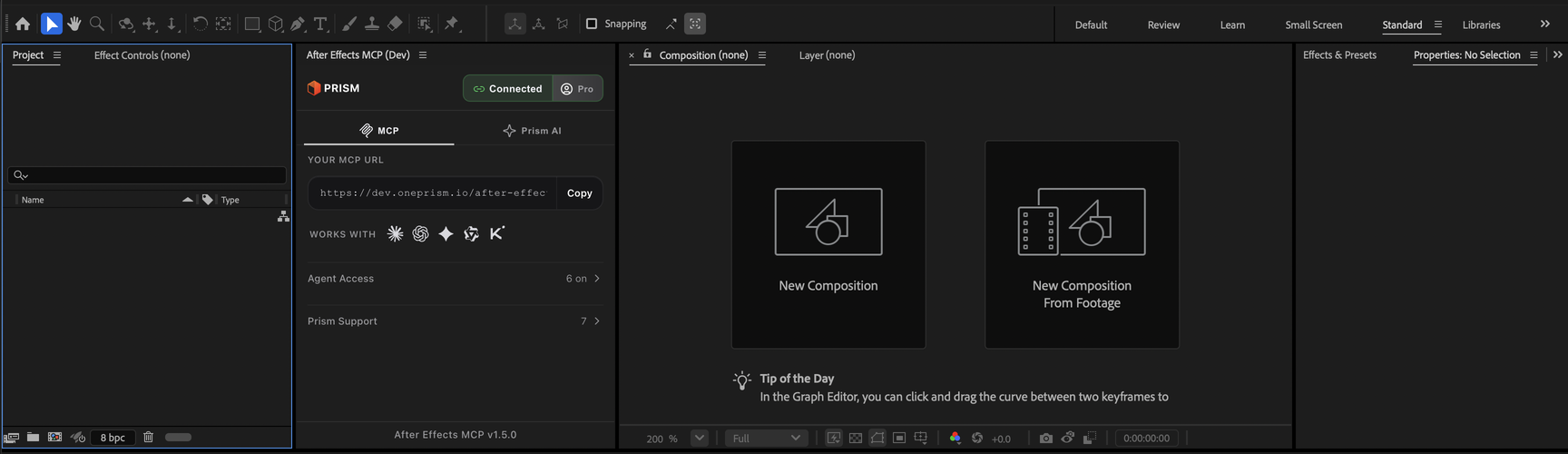
The MCP tab of the After Effects MCP panel
The panel is what you install into After Effects. It has two tabs: MCP, where your AI client connects, and Prism AI, where the generative tools run by hand. This page is the reference for the MCP tab: what each control shows and what it means. Setup lives elsewhere: quickstart, install, sign in and connect your AI. It runs in After Effects 2024, 2025 and 2026; see compatibility.
How to use it
The tab is read, not driven. There is no chat box in it; you talk to your AI in your own client and the panel does the work. When you want to know what the panel knows, ask the AI: "Is Prism connected to After Effects?" It answers with the connection state, the versions and the plan, the same facts the Support section shows you.
What you get
The header
| Badge | Meaning | Do |
|---|---|---|
| Disconnected | The bridge is not started | Click it |
| Connecting… | First connection in progress | Wait |
| Connected | The bridge is up; the agent can work | Nothing |
| Reconnecting… | A transient drop; the panel retries with a growing wait | Wait |
| Retry | Several attempts failed; it keeps retrying about every 30 seconds | Check the network or VPN, then click |
| No plan | The server refused the bridge because the account has no plan | Use the banner; see plan messages |
The full table, with the log lines each state writes, is in connection errors.
Beside the badge sits the account button. Signed out it reads Sign in; signed in it reads your plan, Free or Pro. Clicking it opens the account view: the plan label, the address you signed in with, a usage table with MCP Actions and Prism AI balance and consumed, Buy Prism AI Balance, Sign out, and on Pro a Dashboard link.
Your MCP URL
The address is https://live.oneprism.io/after-effects. It carries no secret and does not change with your plan, so it is shown at once, always copyable and safe to paste anywhere. Sign-in is what links it to your account: the AI client gets its own credential through the browser, and the panel identifies this machine. Under it, How to use with lists the clients; each icon opens that client's connect guide in your browser.
Agent Access
One switch per AI tool, with the count shown as 3 of 6 so a switched-off tool is visible at a glance. A switch governs only what your connected agent may run on its own; each of those runs is billed per use from your Prism AI balance. The same tool stays available by hand in the Prism AI tab whatever the switch says. A flip is saved to your account on the server, so it holds across panel reloads and machines.
Prism Support
Every problem the panel detected, with its fix, plus everything your agent ran this session. Three filters over one list: All, Actions (the default: what your agent ran) and Errors. Copy puts the diagnostic on the clipboard as plain text, an environment header first, then every line with its time and level; paste it into your AI and it tells you what went wrong. Clear empties the log.
Notifications
One banner at a time, above both views. An update notice reads Please update to v… with an Update now button that opens the After Effects page of your dashboard. It appears for a minor release, because a patch reaches you through the server with nothing to reinstall. The footer's version line shows the same cue as Update to v…. Announcements from Prism use the same banner and close for good once dismissed.
Notes and limits
- The panel must be open and signed in for any call to succeed; if it is not, your AI reports that After Effects is not connected rather than guessing.
- One panel per account is addressed. Two signed-in panels on one account make Prism refuse rather than pick; see more than one After Effects.
- Pinned compositions, pinned layers and brand palettes live against your account on the server, which is why they survive a reload.
- The tools live on the server, so new capability arrives without a reinstall; the update notice is only for the panel itself.
Common questions
Any client that speaks MCP. Claude, ChatGPT, Gemini, DeepSeek, Qwen and Kimi have their own guides under connect your AI; others use the same address, see more clients.
Because it identifies nothing. The client signs in through your browser and sends its own credential with every call; the panel signs in separately. Anyone with the address and no account gets a sign-in prompt, not your project.
No. It stops the agent running it unasked. The Prism AI tab runs every tool by hand regardless.
Open Prism Support, press Copy, and paste. The text carries the panel, After Effects and server versions plus every detected problem and its fix, so nothing needs describing twice. See how to report an issue.
The request stops and the AI is told. Work already sent to After Effects finishes there; results that complete while the bridge is down are buffered and delivered on reconnect.
Related
First prompt
Example Prism prompts for After Effects and exactly what comes back: eased keyframes, new comps, SVG import, subtitles and beat markers.
Read
Read mode of the After Effects MCP: before it builds or edits, the agent reads your open project, which comps exist and what each holds. Nothing is uploaded.